Logitech Signature K650 Review: Comfortable Wireless Keyboard for Everyday Productivity
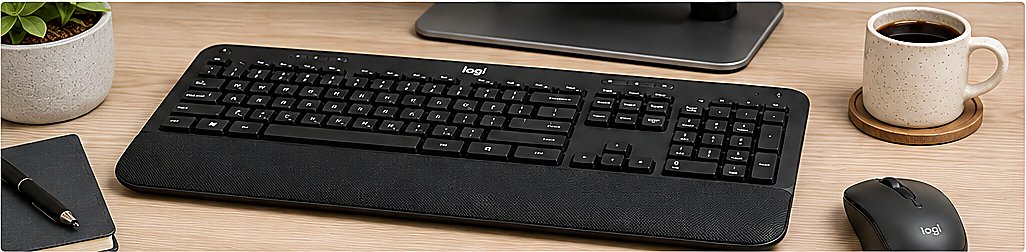
Quick Answer: Is the Logitech Signature K650 Worth It?
Yes—for most home-office users who prioritize comfort and quiet typing. The Logitech Signature K650 combines a full-size layout, integrated palm rest, useful shortcuts, Bluetooth and Logi Bolt connectivity, and an advertised battery life of up to 36 months. Skip it if you need a compact travel keyboard, backlighting, mechanical switches, or fast switching among several devices.
Watch the K650 in 15 Seconds
See the full-size layout, integrated wrist support, and office-focused design before reading the detailed review.
AI-generated visual demonstration. Product appearance may vary. As an Amazon Associate, TechPick Lab may earn from qualifying purchases.
1. Design & Comfort
The full-size layout offers familiar spacing, a dedicated number pad, and a broad wrist-rest area designed for longer typing sessions.

The broad front support gives the palms a comfortable resting area during longer work sessions. It adds comfort but cannot be detached.
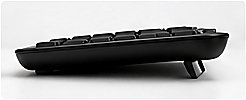
The gently raised rear and low front edge promote a natural hand position. The design is practical and well suited to office use.
2. Typing Experience
The keys are designed for quiet, cushioned everyday typing rather than a loud mechanical feel.

The familiar key spacing and visible legends make the keyboard easy to use for email, spreadsheets, writing, and routine office tasks.

The roomy full-size layout gives both hands plenty of space and is better suited to a permanent desk than to travel.
3. Features & Shortcuts
Productivity-focused shortcuts help with common actions such as media control, calculator access, and frequently used system commands.
4. Connectivity
The keyboard supports Bluetooth Low Energy and compatible Logi Bolt receiver connectivity.

A small USB receiver works well for a permanent desktop or dock, while Bluetooth keeps laptop setups cleaner.
5. Battery Life
Logitech advertises up to 36 months of battery life from the replaceable batteries. Actual results depend on usage, settings, and computing conditions.

The accessible battery compartment is convenient for users who prefer occasional battery replacement instead of another charging cable.
6. Pros & Cons
Pros
- Comfortable integrated wrist support
- Quiet and smooth typing feel
- Full-size layout with number pad
- Bluetooth and receiver connectivity
- Useful productivity shortcuts
Cons
- Large footprint for small desks
- Not ideal for travel
- No mechanical-key feel
- Wrist rest is not detachable
7. Who Should Buy the Logitech K650?
Best for
- Home-office and everyday productivity users
- People who want quiet keys and an integrated palm rest
- Spreadsheet users who need a number pad
- Desks that benefit from Bluetooth or receiver flexibility
Consider another keyboard if
- You need a compact keyboard for frequent travel
- You want backlit keys or a mechanical typing feel
- You regularly switch among three computers or mobile devices
- You prefer a detachable palm rest
8. Logitech K650 vs K780
Both are full-size Logitech wireless keyboards, but they serve different priorities. The K650 is the comfort-focused everyday choice; the K780 is the stronger multi-device option.
| Feature | Logitech Signature K650 | Logitech K780 |
|---|---|---|
| Main advantage | Integrated palm rest and modern productivity shortcuts | Easy-Switch for up to three devices |
| Phone/tablet support | No built-in device cradle | Integrated cradle for phones and tablets |
| Number pad | Yes | Yes |
| Connectivity | Bluetooth Low Energy and Logi Bolt compatibility | Bluetooth and USB receiver |
| Advertised battery life | Up to 36 months | Up to 24 months |
| Best choice for | Comfortable single-desk productivity | Working across several devices |
Specifications checked against Logitech's official K650 and K780 product pages.
9. Frequently Asked Questions
Is the Logitech Signature K650 good for office work?
Yes. Its quiet keys, integrated palm rest, full-size number pad, and productivity shortcuts make it a practical keyboard for email, writing, spreadsheets, and other daily office work.
Does the Logitech K650 support Bluetooth?
Yes. It supports Bluetooth Low Energy and can also connect through a compatible Logi Bolt USB receiver.
How long does the Logitech K650 battery last?
Logitech advertises up to 36 months of battery life. Actual battery life varies with use and computing conditions.
Is the Logitech K650 mechanical or backlit?
No. It uses quiet low-profile keys rather than mechanical switches, and it does not offer key backlighting.
Is the K650 better than the K780?
The K650 is better suited to users prioritizing an integrated palm rest and longer advertised battery life. The K780 is preferable when you want to switch among up to three devices or place a phone or tablet in its built-in cradle.
10. Final Verdict
The Logitech Signature K650 is a strong everyday productivity keyboard for users who value quiet typing, a full-size number pad, long battery life, and comfortable desk use. Its large footprint and lack of backlighting are the main tradeoffs.
View on AmazonReview Disclosure
This editorial review is based on publicly available product information and intended use. TechPick Lab does not claim that this specific unit was personally tested. The images are AI-generated photo-style illustrations and are not official product photographs.